安裝完Ubuntu 8.10 + Vmware 6.5 Guest OS的鍵盤對映錯亂了
無法使用[HOME][END][INSERT][DEL]等key
echo 'xkeymap.nokeycodeMap = true' > ~/.vmware/config
重開Guest OS,測試正常
2008年11月24日 星期一

2008年11月16日 星期日
Ubuntu 8.10 安裝Codecs
Windows中,常用的播放器k-lite mega codecs幾乎可支援大部份的媒體格式了
Ubuntu 8.04中,用了Lazybuntu安裝了許多套件,在8.10中還未測試過Lazybuntu,
於是手動安裝了下列跟媒體播放有關的套件
Ubuntu 8.04中,用了Lazybuntu安裝了許多套件,在8.10中還未測試過Lazybuntu,
於是手動安裝了下列跟媒體播放有關的套件
http://www.medibuntu.org/
http://ubuntu-8-1.blogspot.com/2008/07/downlaod-codec-ubuntu-video-problems.html
http://linuxpoison.blogspot.com/2008/11/multimedia-support-in-ubuntu-810.html
安裝Swiftfox
據說…base on firefox更快的瀏覽器
1.首先,先知道自己主機的cpu類型
2.至http://getswiftfox.com/deb.htm下載適合的安裝套件
3.點選安裝

4.SwiftFox的效能測試
http://wd-testnet.world-direct.at/mozilla/dhtml/funo/jsTimeTest.htm

5.FireFox的效能測試

6.中文化
下載繁體中文add-om
http://releases.mozilla.org/pub/mozilla.org/firefox/releases/3.0.3/linux-i686/xpi/zh-TW.xpi

7.在網址列上輸入 about:config ,搜尋 general.useragent.locale ,並將字串由en-US 改為 zh-TW
1.首先,先知道自己主機的cpu類型
cat /proc/cpuinfo
2.至http://getswiftfox.com/deb.htm下載適合的安裝套件
3.點選安裝
4.SwiftFox的效能測試
http://wd-testnet.world-direct.at/mozilla/dhtml/funo/jsTimeTest.htm
5.FireFox的效能測試
6.中文化
下載繁體中文add-om
http://releases.mozilla.org/pub/mozilla.org/firefox/releases/3.0.3/linux-i686/xpi/zh-TW.xpi
7.在網址列上輸入 about:config ,搜尋 general.useragent.locale ,並將字串由en-US 改為 zh-TW
2008年11月14日 星期五
無蝦米
sudo apt-get install gcin
sudo /usr/share/gcin/script/noseeing-inst

sudo apt-get remove scim

sudo apt-get install im-switch (略)
im-switch -z zh_TW -s gcin     (略)
http://cle.linux.org.tw/trac/
http://www.wmfield.idv.tw/498
http://overinfinityresearch.blogspot.com/2007/10/scimgcin.html
http://cle.linux.org.tw/trac/wiki/GcinInstallBoshiamy
2008年11月12日 星期三
2008年10月2日 星期四
WINE 解決中文亂碼
剛裝完的WINE,執行Notepad,無法正常輸入中文…(當字型為System時)當然如果把Notepad的字型改為中文字體是可以正常顯示的,但偏偏有些軟體,並沒辦法讓你設定表單的字型,ex: exChart2的條件選股的標題嘍 = ="
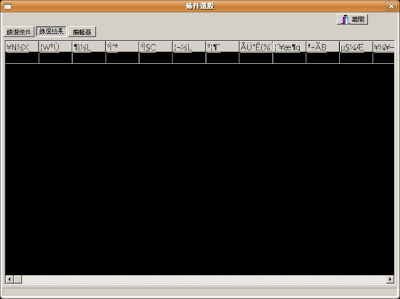
1.將Windows中的字型mingliu.ttc 複製至 ~/.wine/driver_c/windows/Fonts
2.編輯font.reg
3.匯入剛編輯的reg檔
修改完後....
中文顯示已正常嘍...
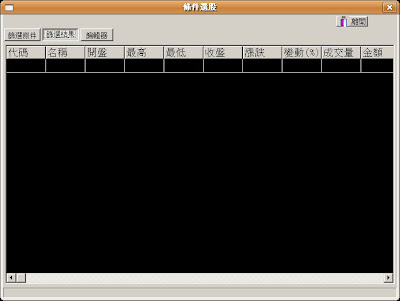
- WINE中文字型解決
1.將Windows中的字型mingliu.ttc 複製至 ~/.wine/driver_c/windows/Fonts
2.編輯font.reg
REGEDIT4
[HKEY_LOCAL_MACHINE\Software\Microsoft\Windows NT\CurrentVersion\FontSubstitutes]
"Arial"="Arial"
"Arial CE,238"="PMingLiU"
"Arial CYR,204"="PMingLiU"
"Arial Greek,161"="PMingLiU"
"Arial TUR,162"="PMingLiU"
"Courier New"="Courier New"
"Courier New CE,238"="PMingLiU"
"Courier New CYR,204"="PMingLiU"
"Courier New Greek,161"="PMingLiU"
"Courier New TUR,162"="PMingLiU"
"MingLiU"="MingLiU"
"PMingLiU"="PMingLiU"
"FixedSys"="PMingLiU"
"Helv"="PMingLiU"
"Helvetica"="PMingLiU"
"MS Sans Serif"="PMingLiU"
"MS Shell Dlg"="PMingLiU"
"MS Shell Dlg 2"="PMingLiU"
"System"="PMingLiU"
"Tahoma"="PMingLiU"
"Times"="Times"
"Times New Roman"="Times New Roman"
"Times New Roman CE,238"="PMingLiU"
"Times New Roman CYR,204"="PMingLiU"
"Times New Roman Greek,161"="PMingLiU"
"Times New Roman TUR,162"="PMingLiU"
"Tms Rmn"="PMingLiU"
3.匯入剛編輯的reg檔
~/.wine/driver_c/windows/regedit.exe
入匯入registry
修改完後....
中文顯示已正常嘍...
(參考出處:http://www.tmes.mlc.edu.tw/wiki/index.php/Wine)
訂閱:
文章 (Atom)